
Your Website Looks Great. Nobody’s Waiting Around to See It.
You paid a designer. You got a beautiful website with a clean layout, flawless branding, and smooth animations. You launched it with pride, sat back, and waited for the phone to ring or the sales to r

You paid a designer. You got a beautiful website with a clean layout, flawless branding, and smooth animations. You launched it with pride, sat back, and waited for the phone to ring or the sales to roll in.
But nothing happened.
While you were admiring your stunning hero image, half of your visitors walked away before the page even finished loading. You did not lose them to a better product or a cheaper competitor — you lost them to a blank screen and a spinning wheel.
It gets worse. Google’s March 2026 core algorithm update quietly turned this drag on your business into an active penalty. If your site was already borderline slow, you likely watched your organic traffic plunge by $20\%$ to $50\%$ in just a matter of weeks.
This article will show you exactly how to diagnose the damage, reclaim your lost traffic, and turn speed into your unfair competitive advantage.
The Brutal Truth About Speed and Design
What good is a million-dollar aesthetic if your customer is staring at a white screen?
We have been conditioned to believe that design is about layouts, typography, and fancy transition effects. But the truth is much simpler: speed is design. If your page does not load instantly, your beautiful layout does not exist.
According to research from sitebuilderreport.com, $70\%$ of consumers openly admit that website speed directly influences their decision to buy. If they cannot even see your site, they cannot buy from you.
Your gorgeous brand experiences mean absolutely nothing to the person who has already hit the “back” button.
So, are you building a digital art gallery, or are you trying to run a business?
What Google Changed in March 2026. And Why Your Rankings May Have Dropped

If your search traffic suddenly fell off a cliff in late March or April of 2026, you are not imagining things.
Google did not just change their mind; they changed the rules of the game. Industry data analyzed by Ahrefs and Semrush in April 2026 confirmed that slower domains suffered immediate, catastrophic losses of $20\%$ to $35\%$, with the slowest sites losing over half of their organic traffic.
If your website is not loading in the blink of an eye, Google is actively burying you.
LCP — The 0.5-Second Rule Change Nobody Was Ready For
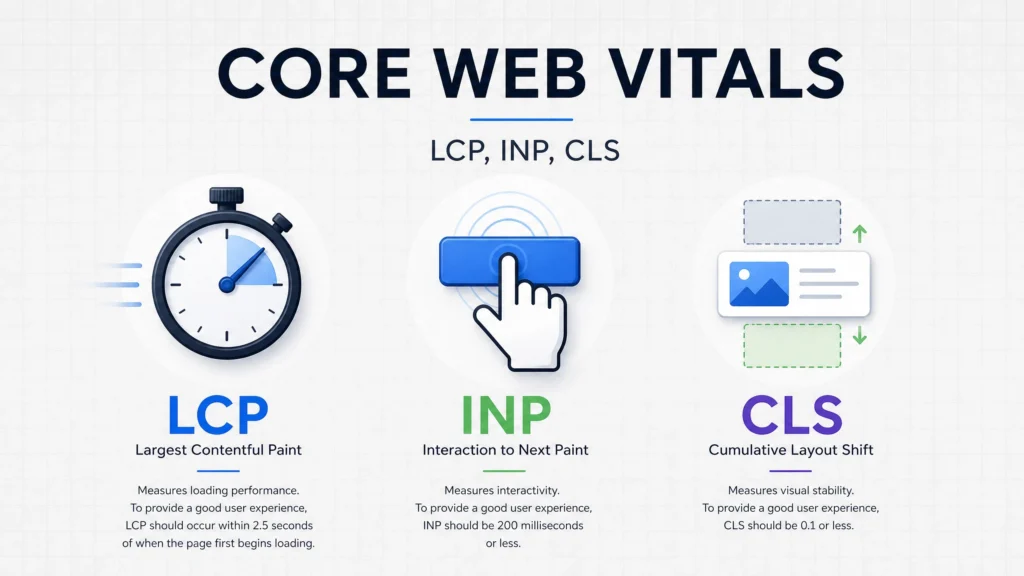
Largest Contentful Paint (LCP) measures how long it takes for your primary on-screen content to load.
On March 18, 2026, Google Search Central announced they were tightening the screws: the acceptable LCP passing threshold was slashed from $2.5\text{ seconds}$ to $2.0\text{ seconds}$. This minor $0.5\text{-second}$ adjustment triggered a massive ranking shift.
Sites stranded in that formerly “safe” $2.0$ to $2.5\text{-second}$ window suddenly failed the audit, causing rankings to drop by $2$ to $4$ positions on highly competitive queries according to digitalapplied.com. That is the difference between sitting comfortably at the top of Page 1 and falling into the digital graveyard of Page 2.
The reality is grim: Whitehat SEO reports that the average B2B mobile LCP sits at a sluggish $7.05\text{ seconds}$. Meanwhile, data from Searchlab shows that top-10 search results average a blazing LCP of just $1.65\text{ seconds}$.
A study from DebugBear and Mewa Studio reveals that the absolute top-ranking spot on Google is $10\%$ more likely to pass Core Web Vitals than the site languishing in position nine.
INP The Metric Most Sites Are Failing Without Knowing It
Have you ever clicked a mobile menu or tapped a signup button, only to experience a tiny, frustrating lag before anything actually happened?
That lag is Interaction to Next Paint (INP), which officially replaced the old First Input Delay (FID) metric. To pass, your site must register user interactions in under $200\text{ ms}$, with $150\text{ ms}$ required for true ranking stability.
If your buttons feel heavy or laggy, your users will abandon your site, and your rankings will quietly slide.
CLS When Your Page Moves Right As Someone’s About to Click
We have all been there: you are about to tap a link on your phone, the layout suddenly shifts, and you end up clicking an intrusive ad instead.
That layout shifting is Cumulative Layout Shift (CLS), and it infuriates users more than almost any other design flaw. To pass Google’s strict requirements, your site’s CLS score must remain below a razor-thin threshold of $0.1$.
If your content jumps around while loading, you are actively driving people away.
The Domain-Wide Rule That Changed Everything
Up until early 2026, Google judged your site’s speed on a page-by-page basis.
According to logoswebdesigns.com, that loophole has been permanently closed with the introduction of domain-wide speed scoring. Now, if your blog pages or product categories are slow, they will drag down the organic rankings of your lightning-fast homepage.
If you do not fix the slow corners of your site, your entire domain will pay the price.
What a Slow Website Is Actually Costing You Right Now
Have you checked your site’s bounce rate lately?
The numbers are far worse than most business owners realize, and they represent real, cold hard cash leaking out of your business every single day. Let’s look at exactly how much this silence is costing you.
The 3-Second Exit
Let’s trace a mobile visitor’s patience using a simple countdown.
- One second: They are focused and waiting.
- Two seconds: Their patience begins to fray.
- Three seconds: Over half of them are gone.
According to data from Google and Firework, $53\%$ of mobile users will abandon your site if it takes longer than $3\text{ seconds}$ to load. Google and Huckabuy found that while a $1\text{-to-}3\text{-second}$ delay bumps bounce rates by $32\%$, a $2\text{-second}$ delay surges it by $103\%$. If you make them wait $10\text{ seconds}$, your bounce rate skyrockets by $123\%$.
This is especially dangerous when you consider that $61\%$ of all web traffic is now mobile, yet mobile devices are $1.7\times$ slower than desktops. Even worse, $80\%$ of mobile sites are currently failing to meet recommended speed guidelines.
The Revenue Calculation Nobody Wants to Do
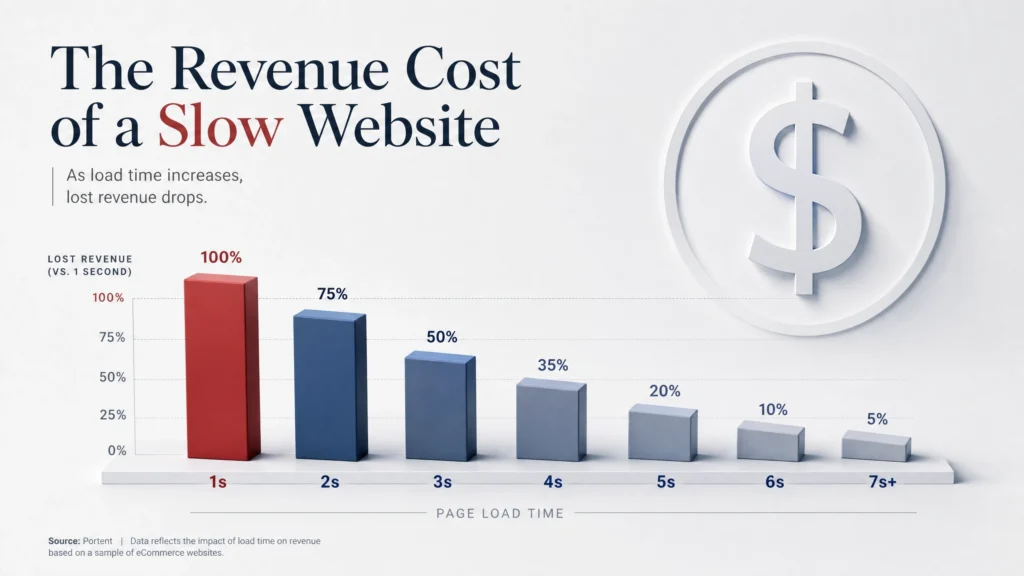
Let’s look at what this delay means for your bottom line.
Amazon famously proved that even a tiny $100\text{ ms}$ delay cuts their sales by $1\%$. For a business generating $\$100,000$ per month, a single extra second of loading time translates to $\$7,000$ lost every single month — costing you $\$84,000$ in lost revenue every year.
Data from Huckabuy shows that you lose $7\%$ of your conversions for every single second of delay. Furthermore, Google warns that a mere $1\text{-second}$ mobile delay can slash conversions by up to $20\%$.
Sites that load in under $1\text{ second}$ convert visitors at $3\times$ the rate of those taking $5\text{ seconds}$. That is not just a minor performance gap — that is a completely different tier of business.
The Reputation Cost That Outlasts the Lost Sale
When your site frustrates a user, they do not just close the tab; they remember the experience.
A study by digitalapplied.com found that $44\%$ of users who experience a slow or buggy website will actively tell their friends about it. Even worse, $79\%$ of those frustrated users swear they will never return to buy from that brand again.
A slow page does not just lose you today’s transaction — it permanently damages your brand reputation.
Six Companies That Fixed Their Speed. Here’s What Happened.
If you think optimizing for speed only yields marginal gains, look at these real-world turnarounds.
These brands did not just tweak their code; they transformed their balance sheets by putting performance first.
- Swappie: Cut load times by $23\%$ and watched their mobile revenues surge by a massive $42\%$.
- NDTV: Improved their LCP by $55\%$, which instantly cut their bounce rate in half.
- Renault: Shaved $1\text{ second}$ off their LCP and generated a $13\%$ jump in completed conversions.
- Vodafone: Boosted LCP by $31\%$, leading to an immediate $8\%$ increase in completed online sales.
- Tokopedia: Optimized their core speed and drove a $35\%$ increase in CTR alongside an $8\%$ conversion bump.
- Amazon: Maintains a strict, obsession-level speed budget because they know $100\text{ ms}$ of latency costs them $1\%$ of their revenue.
These success stories are not statistical outliers. According to Searchlab, websites that successfully pass all three Core Web Vitals metrics enjoy an average $18\%$ boost in organic search traffic.
Yet, only $47\%$ of sites currently pass Google’s thresholds, leaving the door wide open for you to leapfrog your competition.
How to Find Out What’s Actually Wrong
Before you run off to make random changes, you need to measure the actual performance of your site.
Do not guess where your bottlenecks are; use the exact same diagnostic toolkit that Google’s engineers use.
Google PageSpeed Insights
This is your baseline diagnostic test.
Your absolute minimum target for mobile performance is $80$, and anything below $60$ means your site is actively shedding visitors and rankings. Be sure to run tests on both your homepage and your primary landing pages, as templates often perform very differently.
Google Search Console — The Real Story
PageSpeed Insights only gives you a temporary snapshot of a single moment.
Google Search Console shows you the whole film, utilizing Chrome User Experience Report (CrUX) data gathered from real human visits over a rolling $28\text{-day}$ window evaluated at the 75th percentile. Once you apply fixes, expect it to take $4$ to $6\text{ weeks}$ to show in the console, with full organic ranking recovery taking $2$ to $3\text{ months}$.
Three Other Tools Worth Opening
- GTmetrix: Perfect for analyzing your waterfall charts to see exactly which files are blocking your layout.
- WebPageTest: Excellent for simulating real-world connection speeds on older mobile devices.
- DebugBear: The premier tool for tracking Core Web Vitals continuously so you spot regressions immediately.
How to Fix It — In the Right Order
Do not start by micro-optimizing your JavaScript files.
Begin with your heaviest assets, which are almost always your images. Let’s look at the exact steps you need to take to fix your site’s performance.
[Server/Hosting] ──► [CDN Cache] ──► [Optimized Images] ──► [Deferred Scripts]
Fix 1 – Images: Modern Formats
Converting your images to modern formats like WebP or AVIF makes them $15\%$ to $45\%$ faster to load. If your homepage hero image is still a raw, $2\text{ MB}$ JPEG, you have found your LCP bottleneck.
Fix 2 – Render-blocking JS: Defer Scripts
When a browser encounters an unoptimized JavaScript script, it stops rendering your entire page to load it. Add defer or async tags to these scripts so your text and layout can load first.
Fix 3 – Lazy Loading: Offscreen Assets
Why force a user’s phone to download images located at the bottom of your page before they even start scrolling? Enable native lazy loading to slash your initial page weight instantly.
Fix 4 – Hosting: TTFB Optimization
Google recommends keeping your Time to First Byte (TTFB) below $200\text{ ms}$. If you are paying for cheap shared hosting, your server is throttling your performance before your page even begins to load.
Fix 5 – CDN: Edge Delivery
A Content Delivery Network (CDN) like Cloudflare cuts latency by $30\%$ to $60\%$ by serving your site from servers physically closer to your visitors. Research shows CDNs deliver files $3.8\times$ faster, which explains why $71\%$ of the world’s top websites use them.
Fix 6 – Caching: Server-Side
Implementing page caching can boost your site’s speed by $20\%$ to $50\%$. Your web server should never have to rebuild the exact same page from scratch for consecutive visitors.
Fix 7 – WordPress Plugins: Ruthless Audit
Every inactive or poorly coded plugin on your site adds between $1$ and $4\text{ seconds}$ to your load time. Audit your plugin list and delete anything that is not absolutely essential to your business.
Fix 8 – CLS: Explicit Dimensions
Always declare explicit width and height attributes in your image HTML tags. This simple, ten-second fix reserves space for the image beforehand, stopping layout shifts completely.
WordPress Specifically — A Frank Warning
WordPress has the potential to be incredibly fast, but most setups are painfully slow.
The vast majority of WordPress sites suffer from the exact same four traps: bloated themes, too many active plugins, poor caching configurations, and cheap hosting.
If you want a fast WordPress site, you need to build on a clean foundation. Use a lightweight theme like GeneratePress or Astra, pair it with WP Rocket or LiteSpeed Cache, route your traffic through Cloudflare, and host everything on premium, managed WordPress hosting.
When to Call a Technical SEO Agency
Let’s be completely honest: some performance issues require specialized expertise.
If your mobile score remains stuck below $60$, your traffic is still down after the March 2026 update, or you have completed the basic checklists but nothing has improved, you need professional help.
A standard web designer focuses on making your site look pretty. A technical SEO agency manages critical rendering paths, database optimization, server configurations, and advanced JavaScript execution — things a designer will rarely touch.
Conclusion
A beautiful website that loads too slowly is just an expensive billboard buried in a deep forest. If your pages make people wait, your brand does not look premium — it looks broken. The businesses winning the search landscape right now are not the ones with the flashiest transitions; they are the ones that treat speed as their primary design language.
The web has no patience left to give, and Google has already drawn its line in the sand. Pull up Google PageSpeed Insights right now, test your primary mobile page, and look at your score. If it is under $80$, you have a leak to plug — if it is under $60$, your business is actively losing ground, and you finally have the exact roadmap to go fix it.